

Ordering Objects
Objects are stacked inside the active layer, beginning with the first object drawn. The stacking determines how objects will display when they overlap.
The stacking order of your objects can be changed at any time using either the Layers panel or the Arrange commands from the Alignment pane of the Properties panel. Using one of the four commands you can:
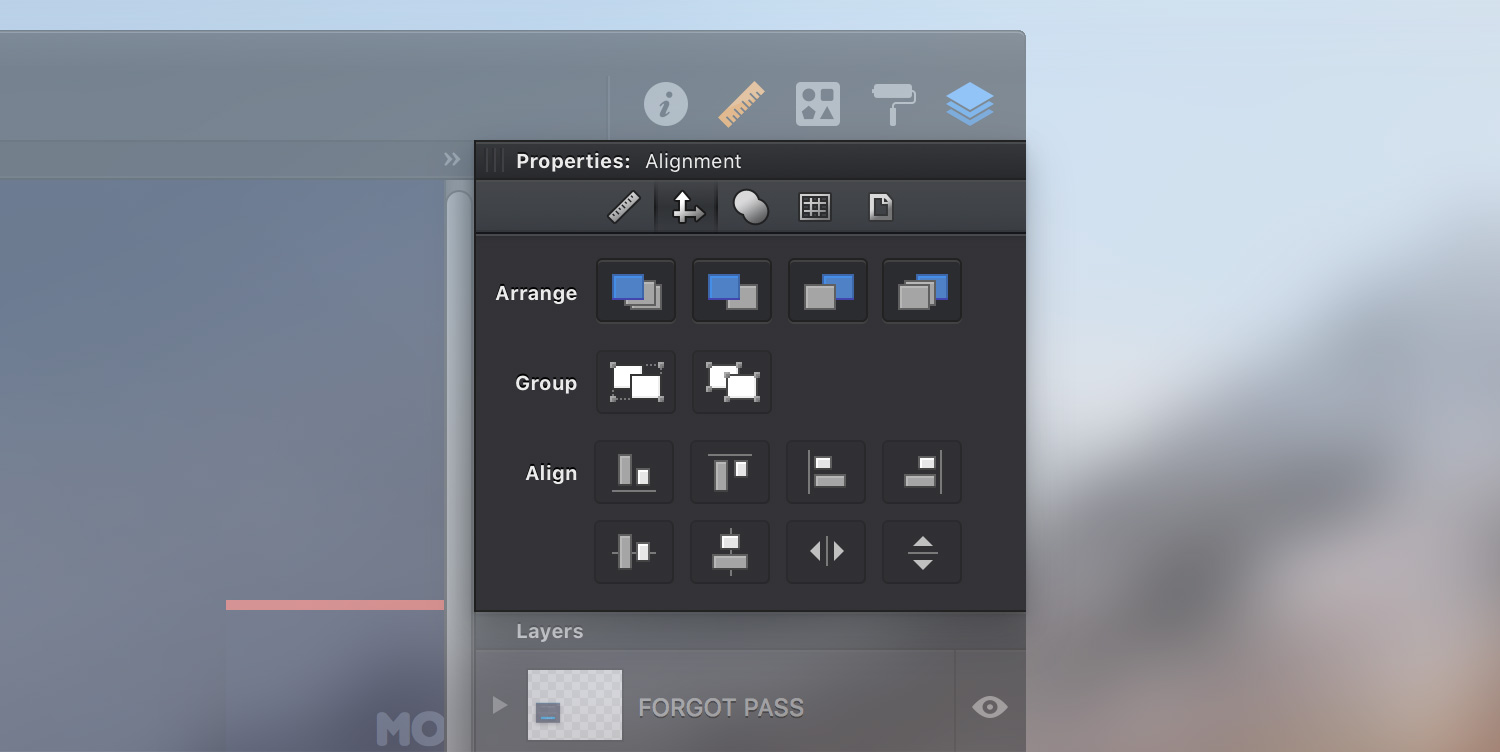
Bring to Front - Moves the selected object/group to front in its group/layer.
Alternatively, you can choose Arrange > Bring to Front [⌘ - ⇧ - ]] from the menu bar or you can simply right click on the canvas and go to Arrange > Bring to Front.
Bring Forward - Moves the selected object/group upward by one object.
Alternatively, you can choose Arrange > Bring Forward [⌘ - ]] from the menu bar you can simply right click on the canvas and go to Arrange > Bring Forward.
Send Backward - Moves the selected object/group backward by one object.
Alternatively, you can choose Arrange > Send Backward [⌘ - [] from the menu bar you can simply right click on the canvas and go to Arrange > Send Backward.
Send to Back - Moves the selected object/group to back in its group/layer.
Alternatively, you can choose Arrange > Send to Back [⌘ - ⇧ - [] from the menu bar you can simply right click on the canvas and go to Arrange > Send to Back.
Getting used with the keyboard shortcuts will make things a lot easier and faster.
Next: Grouping Objects >